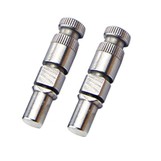
Hey there, fellow drone enthusiasts! If you're into drones, you know that they're pretty cool gadgets, but like any piece of machinery, they sometimes need a little TLC. One common issue that might pop up is a damaged drone shaft. In this blog, I'll be talking about the tools you need to replace a drone shaft. And by the way, I'm a drone shaft supplier, so I've got some good insights on this topic.
Why Might You Need to Replace a Drone Shaft?
Before we dive into the tools, let's quickly touch on why you might need to replace a drone shaft in the first place. Drones can take a beating during flights. Maybe you had a rough landing, or your drone bumped into an object. These incidents can cause the shaft to bend, break, or wear out over time. When this happens, your drone's performance can be seriously affected. For example, a bent shaft can lead to uneven rotation of the propellers, which can make your drone unstable in the air. So, replacing a damaged shaft is crucial to keep your drone flying smoothly.
Types of Drone Shafts
There are different types of drone shafts, each with its own function. The Drone Pitch Shaft controls the forward and backward movement of the drone. The Drone Roll Shaft is responsible for the side - to - side movement. And the Drone Yaw Shaft controls the rotation of the drone around its vertical axis. Knowing which shaft you need to replace is the first step in the process.
Tools You'll Need
1. Screwdrivers
Screwdrivers are a must - have for any drone repair job, including shaft replacement. You'll need different sizes and types of screwdrivers, such as Phillips - head and flat - head screwdrivers. Most drones are held together with small screws, and using the wrong size or type of screwdriver can strip the screw heads, making the repair process much more difficult. Make sure you have a set of precision screwdrivers that are suitable for the small screws on your drone.
2. Tweezers
Tweezers come in handy when you're working with small parts. When removing or installing the shaft, there might be some tiny components like washers or nuts that are easy to drop. Tweezers allow you to pick up and manipulate these small parts with precision. A pair of fine - tipped tweezers is ideal for this kind of work.
3. Pliers
Pliers can be useful for gripping and holding parts in place. If you need to remove a stubborn nut or bend a small piece of metal during the repair, pliers can provide the necessary leverage. Needle - nose pliers are great for getting into tight spaces, while regular pliers can be used for more general gripping tasks.


4. Allen Wrenches
Many drones use Allen screws to secure various components. Allen wrenches, also known as hex keys, are used to turn these screws. You'll need a set of different - sized Allen wrenches to fit the screws on your drone. Make sure you have both metric and standard sizes, as different drones may use different measurement systems.
5. Soldering Iron (Optional)
In some cases, you might need to solder wires when replacing the shaft. If the shaft is connected to the drone's electrical system, you may need to remove and re - attach wires. A soldering iron is used to melt solder and create a strong electrical connection between the wires. However, not all drone shaft replacements will require soldering, so this tool may or may not be necessary depending on your specific drone model.
6. Heat Shrink Tubing (Optional)
If you do end up soldering wires, heat shrink tubing is a great addition to your toolkit. After soldering, you can slide a piece of heat shrink tubing over the soldered joint and use a heat gun or a lighter to shrink the tubing. This provides insulation and protection for the soldered connection, preventing short - circuits and other electrical issues.
7. Multimeter (Optional)
A multimeter is a device that measures electrical properties such as voltage, current, and resistance. If you're unsure about the electrical connections or want to test the new shaft to make sure it's working properly, a multimeter can be very useful. You can use it to check for continuity in the wires and ensure that the electrical system is functioning as it should.
Step - by - Step Guide to Replacing a Drone Shaft
Now that you know what tools you need, here's a general step - by - step guide on how to replace a drone shaft:
- Power Off the Drone: Before you start any repair work, make sure your drone is powered off and the battery is removed. This will prevent any electrical accidents.
- Remove the Drone Casing: Use your screwdrivers to remove the screws holding the drone's casing in place. Carefully lift off the casing to expose the internal components.
- Locate the Damaged Shaft: Identify which shaft is damaged. Refer to the type of shaft (pitch, roll, or yaw) and its location on the drone.
- Disconnect the Shaft: Use your tools to disconnect the shaft from the drone's motor and any other components it's attached to. This may involve removing screws, nuts, or wires.
- Remove the Old Shaft: Once the shaft is disconnected, carefully remove it from the drone. Be careful not to damage any other components in the process.
- Install the New Shaft: Take the new shaft and insert it into the appropriate position. Make sure it's aligned correctly and securely attach it to the motor and other components using the tools you have.
- Re - connect the Wires (if necessary): If you had to disconnect any wires, use your soldering iron and heat shrink tubing to re - connect them properly.
- Test the Shaft: Before putting the casing back on, it's a good idea to test the new shaft. Re - insert the battery and power on the drone (in a safe, open area). Check to see if the drone's movement is normal and if the new shaft is functioning as it should.
- Put the Casing Back On: Once you're satisfied with the test, use your screwdrivers to put the drone's casing back on and secure it with the screws.
Tips for a Successful Shaft Replacement
- Take Your Time: Replacing a drone shaft is a delicate process. Don't rush through it, as this can lead to mistakes and further damage to your drone.
- Keep Track of Parts: As you're removing parts, it's easy to lose track of where they go. You can use a small container or a piece of paper to organize and label the parts as you remove them.
- Refer to the Manual: If you're unsure about any step in the process, refer to your drone's user manual. The manual will provide specific instructions and diagrams for your drone model.
Where to Get the Right Shaft
As a drone shaft supplier, I can tell you that it's important to get the right shaft for your drone. Make sure you know the make and model of your drone and choose a shaft that is compatible. You can find a wide range of high - quality drone shafts on our website. We offer Drone Pitch Shaft, Drone Roll Shaft, and Drone Yaw Shaft that are designed to meet the specific needs of different drone models.
Conclusion
Replacing a drone shaft may seem like a daunting task, but with the right tools and a little patience, it's definitely doable. By having the tools we've discussed, you'll be well - equipped to handle the job. And if you're in the market for a new drone shaft, don't hesitate to reach out to us. We're here to provide you with the best products and support. Whether you're a hobbyist or a professional drone pilot, keeping your drone in top condition is essential for a great flying experience. So, if you have any questions or want to start a procurement discussion, feel free to get in touch. We look forward to helping you with all your drone shaft needs.
References
- Drone repair guides from various manufacturers
- Online forums and communities for drone enthusiasts